US Election Bingo — Watercolor Civic Square 04
An editable US election-themed bingo card for classroom discussions and election-night gatherings. Replace any entries to suit your group. Includes the Watercolor Civic Square 04 design with a matching background and paired fonts.
Your current draft, fixed cards and saved exports will first be saved in My cards. A new workspace will open from this template.
Made for
Election-night gatherings and civics groups
An editable US election-themed bingo card for classroom discussions and election-night gatherings. Replace any entries to suit your group.
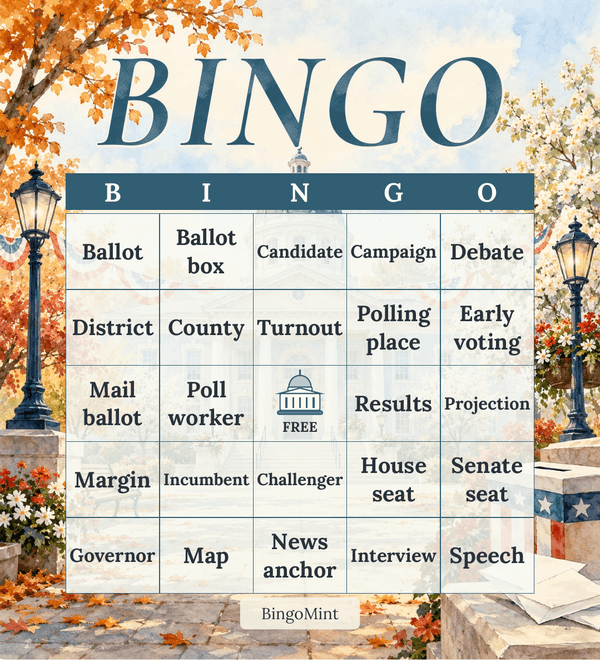
Sample arrangement · Your generated cards will be shuffled.
How to play
- 1
Give each player a card and agree on a winning pattern before the program begins.
- 2
Mark a square when its word or topic appears in the coverage or discussion. Players can keep their own notes.
- 3
When someone calls Bingo, compare the marked squares with the agreed rules before confirming the win.
Included word list
Add, remove or rewrite items in the editor.
- Ballot
- Ballot box
- Candidate
- Campaign
- Debate
- District
- County
- Turnout
- Polling place
- Early voting
- Mail ballot
- Poll worker
- Results
- Projection
- Margin
- Incumbent
- Challenger
- House seat
- Senate seat
- Governor
- Map
- News anchor
- Interview
- Speech
- Reporter
- Microphone
- Community
- Town hall
- Election night
- Votes counted
Ready to print? Follow the paper size and printing guide, then keep an editable backup of your cards.